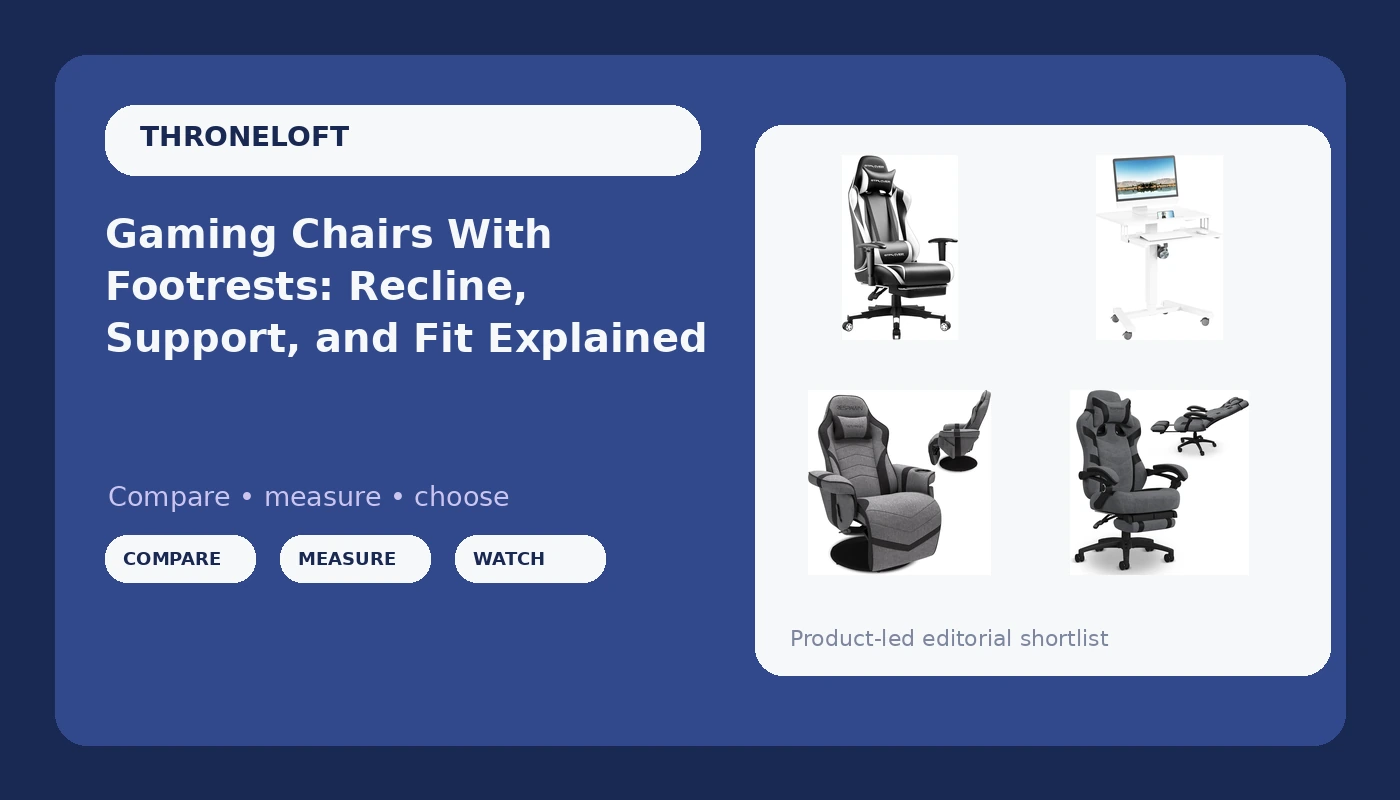
A gaming chair with footrest is sold on the footrest, but that flap is rarely what decides whether you can sit for eight hours without your lower back filing a complaint. What decides it is lumbar support you can adjust, a tilt you can lock, armrests that move in more than one direction, and a seat depth that matches your legs. This explainer walks through four listings that solve the sitting problem in four different ways: two reclining gaming chairs with footrests, one ergonomic gaming chair, and one mobile standing desk for the days when the right answer is not to sit at all. None of them is crowned a winner here. The goal is to help you work out which shape fits your body, your desk, and the length of your sessions.
Related: Lumbar Support Explained: Fixed Bumps vs Adjustable Curves →
Quick answer
Short version: if you want to recline with your feet up during long sessions, the RESPAWN 900 Gaming Recliner Chair with Footrest, Cup Holder and Swivel is the most lounge-shaped option in this group, and the GTPLAYER Gaming Chair with Footrest is the simplest way to try the reclining format. If your priority is posture during desk work rather than reclining, the Respawn 110 Pro Ergonomic Gaming Chair with Footrest and Recline is built around that idea. If sitting itself is what hurts, the ERGOMAKER Mobile Standing Desk with Keyboard Tray takes the chair out of the equation entirely. Check each listing for current price, dimensions, and weight limits, because those details change and none are stated here.
4 useful options
| Model | Best fit | What stands out |
|---|---|---|
| GTPLAYER Gaming Chair with Footrest, Ergonomic Computer Game Desk Chair, Reclining Gamer Chair Seat Height Adjustment, Swivel Rocker with Headrest and Lumbar (White) | A first reclining chair with a footrest | Footrest, recline, swivel rocker base, seat height adjustment, headrest and lumbar cushions |
| ERGOMAKER Mobile Standing Desk with Keyboard Tray, Mobile Podium, Lockable | Players who want to stand for part of the day | Rolling podium with a keyboard tray and lockable casters |
| RESPAWN 900 Gaming Recliner Chair with Footrest, Cup Holder and Swivel | Console and lounge-style sessions | Recliner shape with footrest, cup holder, and swivel |
| Respawn 110 Pro Ergonomic Gaming Chair with Footrest and Recline | Desk sessions where posture comes first | Ergonomic gaming chair with footrest and recline |
Footrest-first pick: GTPLAYER Gaming Chair with Footrest, Ergonomic Computer Game Desk Chair, Reclining Gamer Chair Seat Height Adjustment, Swivel Rocker with Headrest and Lumbar (White)
The appeal here is straightforward: it is a reclining seat with a footrest, a swivel rocker base, height adjustment, and both cushions included. For a first gaming chair, that combination covers most of what people go looking for. The trade-off is that a lumbar cushion is a cushion, not an adjustable mechanism. You can move it, but you cannot tune its depth the way you can with a chair that has a real dial or slide. The footrest also matters less than the marketing suggests unless the seat depth suits your legs. If the seat pan is long, your knees never bend comfortably and the footrest simply holds your legs in a position your hips did not ask for. Treat this as the chair to try the reclining format with, then decide whether you want to pay more for adjustment.
The no-chair option: ERGOMAKER Mobile Standing Desk with Keyboard Tray, Mobile Podium, Lockable
A mobile standing desk is not a gaming chair, and that is exactly why it belongs in this conversation. If your back pain shows up after hour three regardless of how much foam is under you, the honest answer may be to change position rather than buy a thicker cushion. This listing is a rolling podium with a keyboard tray and lockable casters, which means you can stand for one scrim block, roll it aside, and sit somewhere else for the next one. The trade-off is real: you lose the recline and the footrest entirely, and standing all day has its own costs if you never sit down. Used as a rotation tool rather than a replacement, it addresses the part of the problem no chair can fix.
Lounge-first pick: RESPAWN 900 Gaming Recliner Chair with Footrest, Cup Holder and Swivel
This is the option that behaves like a recliner first. The listing describes a gaming recliner with a footrest, a cup holder, and swivel, which tells you what it is designed for: long, leaned-back sessions, console play, and lounging. That shape is comfortable, and comfort is not nothing when you are three hours into a grind. The catch is geometry. The deeper you recline, the further your head moves from the screen, and the harder it becomes to keep your forearms level with a keyboard and mouse. If your setup is a desk with a fixed monitor, a deep recline can push you into reaching forward, which is the exact posture that causes trouble in the first place. Match the chair to the setup, not the setup to the chair.
Posture-first pick: Respawn 110 Pro Ergonomic Gaming Chair with Footrest and Recline
This one is positioned around ergonomics rather than lounge comfort, with a footrest and recline included. The footrest is there for breaks; the recline is there so you can change the angle of your hips during a long day instead of freezing in one position. What matters more is whether the rest of the chair follows through. Check how the lumbar support adjusts, whether the tilt locks, and whether the armrests move in more than one direction. Those three details separate a chair you can sit in for a full scrim block from one that only looks the part. If you play at a desk with a keyboard and mouse, this shape is generally the easier one to keep your forearms and your monitor distance in a workable place.
Prices and availability may change. Product images, names, and retailer links are matched to verified listings. No current price, rating, stock status, or measured result is stated here without current evidence.
What a footrest actually changes about your posture
A footrest does one useful thing: it raises your legs, which changes the angle at your hips and takes some load off the lower back, particularly when you are reclined. That is why recliners and loungers feel so good. It is not a gimmick, but it is also not a substitute for support. Two conditions have to be met before the footrest helps. First, the seat depth has to match your legs. If the seat pan is long, your knees stay straight and the footrest simply props your legs in a position your hips did not choose. Second, the backrest has to hold your lumbar curve at whatever angle you are sitting. A deep recline with no lumbar support converts a slouch into a slide.
There is also a practical conflict at a desk. Pulling the footrest out while your keyboard sits on a fixed surface tends to push you forward off the backrest, so your lower back loses contact with the chair exactly when it needs it most. Use the footrest when you are leaning back and away from the desk, not while you are mid-match and reaching for the mouse.
How to judge support before you buy
You cannot test a chair through a product photo, so judge the mechanism instead of the marketing. Adjustable lumbar support, meaning a piece you can move up and down and often in and out, is worth more than a fixed bump or a strap-on cushion. A tilt mechanism with a lock lets you pick an angle and keep it, which is what stops the slow slide into a slouch over a long session. Armrests that adjust in three or four directions let you bring support to your elbows instead of contorting your shoulders to reach fixed pads. Then check the boring numbers on the listing: seat height range against your desk, seat depth against your leg length, and the stated weight capacity against yours. A chair that is too tall for your desk or too deep for your legs will hurt no matter how good the foam is.
- Decide whether you want to recline or sit upright for most of a session. That answer picks the chair shape before any feature list does.
- Check the lumbar mechanism. Adjustable beats a fixed cushion every time.
- Confirm the tilt locks at an angle you would actually use, not just at full recline.
- Compare the listed seat height range with your desk height, and the seat depth with the length of your thighs.
- Confirm the listed weight capacity, the material, and any assembly notes before you commit.
Practical checks that save you a return
- Measure your desk height first, then compare it with the seat height range on the listing. A mismatch is one of the most common reasons a chair goes back.
- If you share the room, note whether the base has lockable casters, as the mobile desk listing does.
- Read the listed weight capacity rather than assuming a chair will hold you because it looks sturdy.
- Think about floor space. Recliners and footrests need room behind the backrest and in front of the seat.
- Choose material based on your room. Mesh moves air, while foam and upholstery hold warmth.
Which option should you choose?
Choose the GTPLAYER Gaming Chair with Footrest, Ergonomic Computer Game Desk Chair, Reclining Gamer Chair Seat Height Adjustment, Swivel Rocker with Headrest and Lumbar (White) when you want a reclining chair with a footrest, headrest, and lumbar cushions without committing to a complex mechanism, and you are comfortable moving a cushion rather than turning a dial. Choose the ERGOMAKER Mobile Standing Desk with Keyboard Tray, Mobile Podium, Lockable when the problem is sitting itself and you want to alternate between standing and a separate seat through the day. Choose the RESPAWN 900 Gaming Recliner Chair with Footrest, Cup Holder and Swivel when your sessions are console-style and leaned back, and your screen can move with you. Choose the Respawn 110 Pro Ergonomic Gaming Chair with Footrest and Recline when you play at a desk for hours and posture is the priority.
One limit applies to all of this: nothing here is based on a hands-on test of these four listings, and no measurements, ratings, or durability results are claimed. The features described come from the product names and listings themselves. Verify dimensions, weight capacity, materials, and current price on each listing before buying, and treat any chair you cannot adjust as a chair you will eventually fight.
The bottom line
A gaming chair with footrest is a shape, not a guarantee. The footrest helps when you recline and when the seat depth suits your legs, and it does very little when the lumbar support is a fixed cushion and the tilt will not stay where you put it. If your sessions run long, spend your attention on the adjustable parts: lumbar, tilt lock, and armrests. If your back hurts no matter what you sit in, add a standing option to the rotation instead of buying a thicker cushion. And if you are buying your first reclining chair, pick the one whose shape matches where your screen actually is, because no footrest rescues a setup that makes you reach forward all night.