
How To Adjust A Gaming Chair
Well, here's the thing about gaming chair adjustment guides. They all assume you're starting with a chair that's worth adjusting. I've spent the last eight years and roughly 15,000 hours sitting in these things, and I can tell you that 80% of adjustment problems come down to one of two issues: you bought a chair that doesn't fit your body in the first place, or you're fighting a mechanism that was loose from day one.
I'm Jae. I've owned four chairs in that time. A $120 Amazon special that collapsed mid-match, a GT Racing that bottomed out in 11 months, an Anda Seat that was built like a tank but punished my 6'1", 220 lb frame, and the Secretlab Titan I've had for two years now. I've adjusted all of them. I've cursed at all of them. This guide is what actually worked.
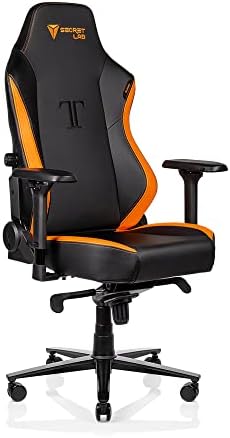
Secretlab Titan
Cold-cure foam holds shape, armrests adjust four ways, tilt lock stays put
Visit on Amazon →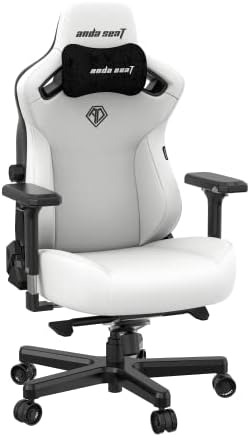
Anda Seat Kaiser 3 Large Gaming Chair for Adults - Ergonomic Black PVC Leathe...
Built for big frames, wide seat base, steel frame
Visit on Amazon →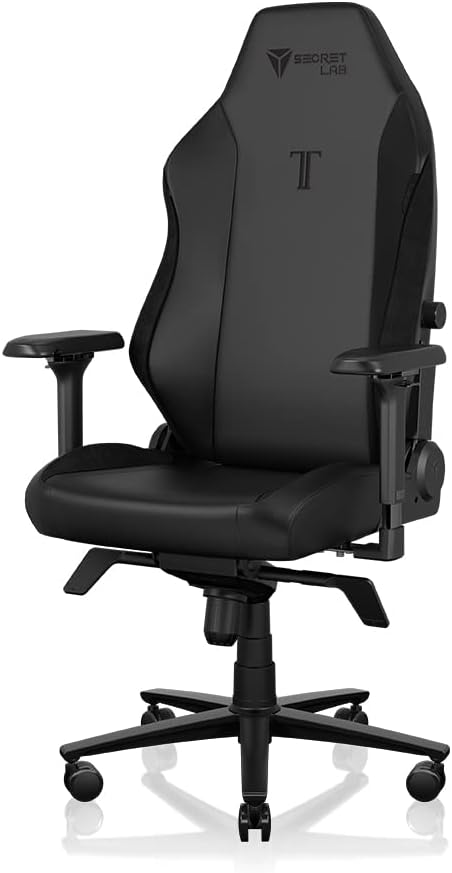
Secretlab Titan Evo XL Black Gaming Chair - Leatherette, Ergonomic
Premium ergonomic chair with adjustable features
Visit on Amazon →Before You Adjust Anything, Check The Fit
Here's the thing nobody tells you. You can't adjust your way out of a chair that's the wrong size. I learned this the hard way with the Anda Seat. It was a perfectly good chair. The lumbar was adjustable, the armrests moved in every direction, the recline locked at a healthy angle.
But the seat pan was too narrow for my frame, and no amount of fiddling fixed that. My hips were pinched by hour three of every session.
If you're over 6 feet or north of 220 pounds, measure your seat width before you buy. Most "tall" chairs are a lie. I've sat in chairs marketed for tall gamers that felt like they were built for a child.
The spec that matters is the seat pan width, not the backrest height. You want at least 20 inches of seat width for a bigger frame.
The Anda Seat Kaiser 3 runs wider than most, which is why it's the one I recommend to the big guys despite its flaws.
The Lumbar Is The Whole Game
Your lower back is where every hour you sit gets banked or billed. I thought I had naturally bad posture for years. Turns out the bucket seat I was sitting in was forcing a hunch. Two weeks with a properly adjusted lumbar and my neck pain disappeared. I didn't know a chair could do that.
Here's the adjustment sequence that works. Sit in the chair with your back pressed against the backrest. Find the lumbar adjustment, whether it's a dial, a lever, or a pillow on a strap. Position it so it fills the curve of your lower back, not your mid-back, not your butt.
The curve should feel like a supportive hand, not a jab. If it's a pillow on a strap, it's going to slip.
Every one I've tried slips within 20 minutes. The built-in dial systems on the Secretlab and the Anda Seat hold their position because they're mechanical, not velcro.
The Razer Iskur's fixed lumbar curve is the exception that proves the rule. Some people swear by it. Others say it feels like a board pressing into their spine. I respect the bold design choice, but a fixed curve is a gamble on your back. If you can't adjust it, it's not for you.
Armrests: The Wobble Test
Rest your elbows on your armrests right now. Put your weight on them. If they move even a quarter inch, they're a toy. You rest your arms on these things for hours a day. They need to be solid.
The adjustment that matters most is height. Your arms should rest at a 90-degree angle, elbows at your sides, forearms parallel to the floor. This keeps your shoulders relaxed instead of hunched up toward your ears. The four-way adjustment on my Secretlab Titan is the best I've used, but honestly, height is the one I actually change. The other directions are nice-to-haves.
The GT Racing chair I owned had armrests that wobbled from day one. Not a huge amount, but enough that I was always aware of it. By month nine, the foam padding had compressed into something close to hard plastic. I was resting my elbows on rocks. That's the budget tier in a nutshell: it feels fine in the showroom, then it betrays you slowly.
Tilt Lock And Recline: The 90-110 Degree Rule
Your chair's tilt lock is the mechanism that keeps your recline angle where you put it. If it's loose, you'll be fighting the chair all day, slowly sinking backward until you're staring at your monitor from a recline that would make a dentist weep.
Here's the setting I use. For active gaming sessions, I lock the recline at roughly 90 to 100 degrees, slight backward tilt, enough that my back is supported but I'm not slouched. For breaks and reading, I'll unlock it and lean back, but I never play competitive matches reclined. Your reaction time drops, and your posture collapses.
The Secretlab Titan's tilt lock has held its position for two years. Not once has it slipped mid-session. The GT Racing's started loosening around month seven. By the end, I was locked in at whatever angle the chair felt like settling into. A chair that won't stay where you put it is a chair that's dying.
Seat Height And The Sinking Problem
Your feet should be flat on the floor, knees at roughly 90 degrees, thighs parallel to the ground. That's the target. Most chairs adjust this easily with a gas lift lever.
The problem is when the gas lift fails. I'm talking about sinking, the slow descend throughout the day where you start at the right height and end up at chin-level with your monitor by evening. I've had it happen on two chairs. The first was the $120 Amazon special, which collapsed entirely mid-match during a ranked session. Just dropped me on the floor. My teammates still bring it up.
If your chair sinks, it's not an adjustment problem, it's a failure. You need a new gas lift or a new chair. There's no fixing a sinking lift with a lever position. Don't waste your time.
The Head Pillow Question
Head pillows are the most overthought adjustment in the gaming chair world. Here's my take. If you're actively gaming, the head pillow should sit at the base of your skull, supporting your neck, not pushing your head forward. If you're leaning back to watch a cutscene or read, you can move it up a bit.
The Secretlab's magnetic head pillow actually stays where I put it. That sounds like a small thing until you've fought a slipping pillow for a year. The strap-on pillows that come with budget chairs are a constant battle. Every time you shift your weight, the pillow slides down an inch. By hour two, it's at your shoulder blades doing nothing.
Assembly: Where Adjustments Go To Die
You can't adjust a chair you assembled wrong. I've stripped bolts, lost screws, and spent 45 minutes on chairs that should take 15. The instructions that come with most gaming chairs are garbage. The Secretlab was the exception, clear steps, labeled bolts, everything where it should be. Took me about 20 minutes.
The one thing I'll tell you about assembly: tighten everything, then tighten it again after a week. Chairs settle, bolts loosen, and a chair that was solid on day one can develop a squeak by day ten. That squeak will drive you insane. It never gets better, only worse.
The Cost Per Day Math
Here's the thing about adjusting a chair. You only need to do it well once, but you need a chair that will hold the adjustment. The $200 GT Racing I owned cost me about 60 cents a day across its 11-month life, and that's before I count the back pain and the replacement cost. My $500 Secretlab has cost me about 34 cents a day over two years, and it's still holding its settings perfectly.
The math is the argument. Buy once, cry once isn't a cliché, it's arithmetic.
The Break-In Period
One thing I want to say about stiff chairs. A stiff chair isn't necessarily a bad chair. The Anda Seat I owned was brutal for the first two weeks. I thought I'd made a mistake. Then it loosened up, and the support was exactly what my back needed. The Noblechairs models run similar, stiff out of the box, comfortable after a few weeks of regular sitting.
If you buy a chair that feels hard, give it two weeks before you judge it. If it's still punishing you after 30 days, that's a different story. But don't return a chair on day three because it's stiff. You might be giving up on exactly the support you need.
What I'd Do Differently
I bought the cheap one first. We all do. I wish I'd skipped the GT Racing entirely and gone straight to the Secretlab. That's the most common sentence in gaming chair forums, and it's true. The budget tier is a rental, not a purchase. If you're sitting more than four hours a day, save up and buy something that will hold its settings for years.
My Honest Bottom Line
Adjusting a gaming chair comes down to three things: the lumbar needs to hit your lower back and stay there, the armrests need to hold your arms at 90 degrees without wobbling, and the tilt lock needs to keep your recline angle locked. If your chair can do those three things, you're set. If it can't, no adjustment guide will save you. You need a different chair.
I've been where you are. I've wrecked my back and burned my money on chairs that died in a year. The chair isn't the accessory. You are. Treat it like the most important piece of equipment you own.